


How can an ideal instructional environment be designed to maximize focus, encourage knowledge retention, and leverage cutting-edge AV technology for both in-person and virtual participants? When hosting instructional meetings like trainings, workshops, or corporate lectures, the setup of the meeting room plays a pivotal role in ensuring that the session achieves its objectives. An ideal instructional environment maximizes focus, encourages knowledge retention, and leverages AV and collaboration technology to enhance in-person and virtual participation. This detailed guide explores optimal meeting room layouts, highlights cutting-edge AV technology, and explains how GPA, a global AV system integrator, can help future-proof instructional spaces.
Why Room Setup is Critical for Instructional Meetings
Instructional meetings are built around sharing knowledge. Whether for corporate trainings or interactive workshops, the room design greatly influences how information is shared and absorbed effectively. A poorly designed space can hinder collaboration, create distractions, or make it difficult for attendees to focus. On the other hand, the right setup enhances visibility, facilitates smooth communication, and improves the learning experience for everyone involved.
Common Layouts for Instructional Meetings
Your setup depends on the session type: an hour-long training, an intensive workshop, a large lecture, or even a multi-day event to update large audiences about the latest updates in the industry. Here’s a quick look at commonly used layouts for instructional meetings:
1. Classroom Style

- Structure: Tables and chairs are arranged in rows, all facing the front of the room.
- Best For: Corporate trainings that require substantial note-taking or the use of laptops.
- Advantages: Familiar, easy to organize, and perfect for focused learning.
- AV Tools to Include: Projectors, large displays for presentations, and device charging ports are key for enhancing the learning experience.
2. Theater Style

- Structure: Chairs are arranged in rows without tables.
- Best For: Large-scale instructional meetings, keynote sessions, or guest lectures.
- Advantages: Optimizes space, accommodates large groups, and focuses attention on the stage.
- AV Tools to Include: LED video walls, wireless microphones, and surround sound speakers ensure everyone can see and hear.
3. U-Shape Setup

- Structure: Tables are arranged in a U, with chairs on the outside edges.
- Best For: Interactive workshops and smaller group discussions.
- Advantages: Encourages collaboration between participants while keeping focus on the presenter.
- AV Tools to Include: Multiple screens for shared visibility and video conferencing tools to support hybrid collaboration.
The Importance of AV Technology in Instructional Spaces
Smart AV technology acts as the backbone of any instructional setup. Whether in corporate trainings or interactive workshops, having the right AV tools allows the presenter to communicate ideas effectively while creating a seamless experience for all attendees. Here are the must-have AV solutions for instructional meetings:
1. Interactive Whiteboards and High-Resolution Displays
Interactive whiteboards add an element of engagement to instructional meetings by allowing real-time collaboration. Attendees can share thoughts, notes, or ideas while the instructor annotates directly on the screen for clarity.
2. Deeply Integrated Collaboration Technology
Modern workshops and hybrid trainings demand tools like advanced video conferencing platforms (e.g., Zoom or Microsoft Teams) paired with collaboration technology. With built-in screen sharing, live polls, and Q&A features, these tools effortlessly connect remote and in-person participants.
3. Smart Sound and Video Systems
Crystal-clear sound systems and cameras equipped with zoom and tracking features are crucial. Remote attendees should feel as much a part of the session as those seated in the room, which means noise-canceling microphones, advanced cameras, and wireless sound systems are must-haves.
4. Adaptable Spaces for Evolving Needs
Technology-driven flexibility is crucial. For example, motorized furniture and modular setups enable the room to switch between theater style, classroom format, or U-shaped layouts according to the day’s needs.
Hybrid Work’s Influence on Instructional Workspaces
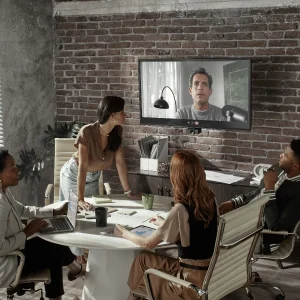
Hybrid work models have reshaped instructional meetings, trainings, and workshops. Presenters today must often lead from remote locations while engaging an audience split between in-person attendees and those dialed in virtually. This dynamic calls for advanced AV and collaboration technology that ensures inclusivity, such as:
- Multiple Camera Angles: Gives virtual attendees a 360-degree view of the room while highlighting the presenter and active participants.
- Immersive Sound Systems: Ensures participants in hybrid setups can communicate without audio delays or interruptions.
- Interactive Tools: This includes technology like shared whiteboards and collaborative platforms to keep everyone engaged, regardless of location.
- Recording Capabilities: Sessions can be recorded for later use, extending the benefits of trainings to employees who couldn’t attend or want to revisit materials.
Future-Proof Your Instructional Meeting Rooms
Instructional setups must stand the test of time, adapting to evolving technologies and trends in corporate learning. Here’s how to create spaces that will support impactful workshops and trainings well into the future:
1. Scalable AV Systems
Invest in systems that can evolve along with your organizational needs. For instance, modular setups allow adding AI-driven meeting assistants or integrating augmented reality (AR) and virtual reality (VR) technologies.
2. Cloud-Based Solutions
Cloud platforms simplify collaboration and file sharing during hybrid meetings. Cloud recording capabilities also allow seamless pre- and post-event management.
3. Ergonomics and Accessibility
Comfortable seating, natural lighting, and accessibility for people with disabilities create an inclusive, productive environment. Don’t forget that professional trainings and important business workshops usually do not take just an hour but sometimes even several days.
4. Maintenance and Support
Avoid the risk of tech failures that could disrupt a critical training session by establishing 24/7 AV support agreements or service subscriptions. Consistent system updates and checkups ensure technology stays reliable.
Where GPA, a Global AV System Integrator, Leads the Way
When designing and deploying instructional meeting rooms, GPA stands out as a trusted partner for global enterprises. With expertise spanning AV integration and collaboration technology, GPA ensures consistent, scalable solutions across all corporate sites. Here’s what sets GPA apart:
- Tailored Room Setups: Whether classroom, U-shape, or theater style, GPA designs solutions that align with your training objectives and meeting structure.
- Hybrid Optimization: GPA’s expertise ensures that hybrid instructional meetings seamlessly integrate remote and in-room participants using cutting-edge collaboration tech.
- Global Consistency: With over 170 offices worldwide, GPA specializes in standardized deployments for cross-location consistency and quality.
- Service Excellence: Maintenance contracts, 24/7 customer support, and troubleshooting expertise keep your AV systems in top condition.
Partnering with GPA guarantees operational efficiency and ensures that your meeting infrastructure is built to scale with your organization.
Practical Tips for Maximizing Success in Instructional Meetings
- Test Systems Beforehand: To avoid disruptions, run audiovisual tests on microphones, cameras, and digital displays before your instructional meeting.
- Encourage Participation: Equip presenters and moderators with tools like instant polling features to foster engagement.
- Focus on Connectivity: Reliable internet connections and strong video conferencing integrations are essential for hybrid setups.
- Regular Upgrades: Regular audits of your AV systems help keep up with advancements like AI integration and 4K displays.
Summary
Transforming instructional meetings, trainings, and workshops into productive, engaging experiences requires more than just a good presenter. It takes a thoughtfully designed room, integrated collaboration technology, and reliable AV systems to disseminate effective knowledge. GPA, as a global AV system integrator, offers specialized services to create spaces that adapt to training sessions’ current and future needs. By investing in GPA’s innovative solutions and comprehensive support services, you can establish consistent, state-of-the-art meeting environments across the globe.
Equip your instructional setups with technology that empowers, not limits. The right combination of design and AV tools will ensure your message is heard, understood, and remembered. If this sounds like something you need, contact us today for a consultation or to allow us to help with your questions.





 DE
DE  EN
EN  ES
ES  FR
FR  PT
PT  ZH
ZH